SweeperCAD
The simplest 3D modeller for the most complex shapes.
Free — Windows, macOS and Linux.
version 0.9.9.9 · older versions
🔔 SweeperCAD never checks for updates by itself — it doesn’t go online*, so it can’t tell you. Come back here now and then: these buttons always give you the latest version.
📖 User manual PDF 🎓 Tutorials for beginners 📋 Cheat sheet
☕ Support SweeperCAD on Ko-fi Part of every donation goes to environmental causes, to make up for the AI used to build SweeperCAD.
Opening it the first time
Your computer will warn you the first time, because SweeperCAD is made by one person and not registered with Apple or Microsoft. That is normal. You only do this once.
Mac
- Open the downloaded .dmg and drag SweeperCAD into Applications.
- Double-click SweeperCAD in Applications. macOS says it can’t check it — click Done (or OK).
- Open System Settings → Privacy & Security and scroll down to Security. Next to “SweeperCAD was blocked”, click Open Anyway.
- Confirm with your password (or Touch ID), then click Open Anyway once more. Done.
On macOS 14 or older it is quicker: right-click (or Control-click) SweeperCAD in Applications, choose Open, then Open again.
Windows
- Right-click the downloaded .zip → Extract All… (don’t run it from inside the zip).
- Double-click SweeperCAD.exe. If a blue “Windows protected your PC” box appears, click More info, then Run anyway.
Linux
- Unpack the .tar.gz and run ./SweeperCAD inside it. The README lists any system libraries it needs.
Needs macOS 12.3 or later, Windows 10 or later, or Ubuntu 22.04 or similar. Which Mac do you have? Apple menu → About This Mac: “Apple M…” is Apple Silicon, “Intel” is Intel.
In one picture
A shape is a profile swept along a spine with a scale graph; combine, fillet, array - and every curve stays live to drag. Forty seconds from Part 3.
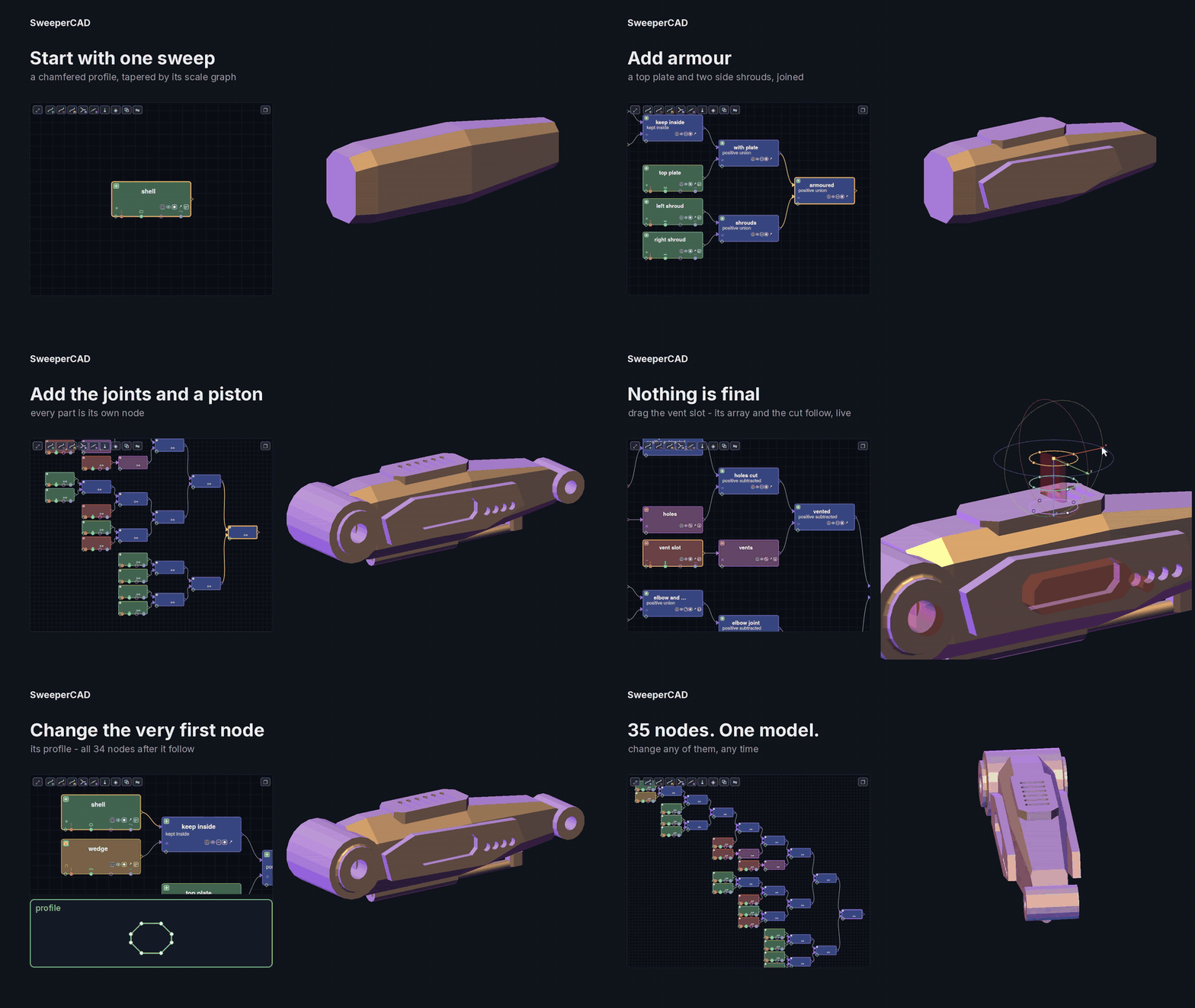
Link to it: sweepercad.com/sweepercad-nodes.gif
From the library
Parts and projects people made in SweeperCAD — free to download, open and change. Made something? Share it, no account needed.
Six of them taken apart, step by step: a teapot · a nautilus shell · a robot arm · a potted plant · a cute robot · an elliptical-wing aircraft
Make it with AI
SweeperCAD works with the AI you already use — Claude, ChatGPT or one on your own computer. No subscription, and by default the app sends nothing anywhere: you choose what to paste where.
- Describe it — “a vase, 120 mm tall, wavy rim, 3 mm wall” — and press Copy for AI. Or sketch it: the sketch pad takes free-hand lines, straight lines and smooth curves, or you can draw over a photo of a napkin sketch, and the drawing goes to the AI with your words. To change what it made, draw on the model itself — circle, arrow or cross out in red what should be different.
- Paste it into your AI and copy its answer.
- Press Paste the answer & run. The part appears, as a real solid you can keep editing, fillet and export.
Want it different? Type the change — “make the rim wavier and add a foot” — and go round again. SweeperCAD hands the AI what its script actually made, measured — sizes, volume, loose pieces, anything the build complained about — and pictures from four sides, so it checks its own work instead of you having to explain what went wrong.
Or let it run by itself — only if you choose to. Switch on AI settings, use your own Claude or ChatGPT key, or an AI on your own computer (then nothing leaves it at all), and press Do it for me: it asks, builds, measures, looks and improves, a few rounds, each one in front of you. Off unless you turn it on, and an AI on mark shows whenever it is.
What it costs: the copy-and-paste way works with the free accounts of Claude or ChatGPT. Do it for me needs either an AI on your own computer (free) or an API key from Claude or ChatGPT, which they bill per use — a few cents per go. How to set it up, in the manual.
Videos
0, the idea: most 3D software picks a tool - extrude, revolve, loft or sweep. SweeperCAD has one: a profile along a spine, with a scale graph and an end profile. Cube, cone, ball and torus morph one into the next by moving those handles. Everything is a sweep - hence the name.
Profile, spine, scale graph, booleans, fillets and arrays in 50 seconds - every picture made by SweeperCAD itself.
Part 2, the deeper tools: editing live in 3D, drawing, start and end profiles, twist and roll, chains that morph, placing on surfaces, blends, measuring, lattices and references.
Part 3, non-destructive hard surface: a mech arm built from 35 nodes - intersect, subtract, arrays, blends - then a part dragged and the very first profile changed, and everything after it follows.
Part 4, precise - loose when you want it, exact when you need it: drag points and handles right in 3D, then place on a surface, measure and keep a distance, and link profiles across nodes; the sketch editor's live dimensions, angles, constraints and corners (sharp, chamfer, round, bezier); the dials and the pivot; and variable-radius fillets to G2.
Part 5, work with what you have: a mesh as a reference, the section plane cutting it, five cuts becoming a stack of linked sweeps that rebuild it as editable CAD - then the same mesh worked on directly as a polygon part, read as a smooth CAD surface, and a STEP imported and slotted.
Part 6, math, names & links: every number field is a small calculator - type 360/3 and it is 120; use another object's own numbers by its name (tube.length + 2, tube.radius + 1 for a clearance) and names of your own, and everything that uses them follows; click a part to drop its number into the field; and the measure tool now links rotation and scale between two parts - with their offset kept, turn or grow either one and the other follows.
Part 7, check it: look inside with the section slider, the numbers (size, surface, volume, weight in a material), walls thinner than you allow, a bracket held and pushed with the stress on it, and zebra stripes that show whether a blend is really smooth.
Part 8, shape it: a profile built from several shapes - pick a preset, add it, and the outline is their live Boolean, every shape still editable; draw on surfaces and fill a closed loop with a texture that follows the curve, carve it with a stroke; drop parts and let them settle; a route that finds its own way around; patch holes in a scanned mesh and sweep it into smooth CAD; the casting check - where a part sets last and how it fills from the gate - with a runner routed from the gate; and machining: toolpaths for a 3-axis router, simulated on the stock, checked, then G-code.
Part 9, unfold: lay a part out flat at true size to print and cut. Paper and card come out exact, with glue tabs, numbered seams and fold lines; fabric and leather as panels with a stretch map, seam allowance and notches. Place your own seams and darts, keep any automatic split joined, then print at 100 % (the 50 mm bar checks it), or save a PDF or an SVG for a cutter or laser.
Part 10, glasses, moulds and making: lenses from a prescription, cut the way an optician cuts them, checked against the curve of your face, with a data sheet for the optician - a study tool, not medically approved. Moulds for any part: a thin eggshell to print, cast into and crack away - or split along one or more cuts, pie-wise or on a plane you place, with flanges, registration bumps, a funnel, vents, a core, engraved text, and cracks only where the mould would lock; or a cradle, a box or a pour box around it. A part too big for the printer is cut to fit, with tenons and mortises or dowel holes. And parts cut from flat sheets: stacked layers, a slotted waffle, or a box with finger joints and a living hinge - as pages to print or an SVG straight to a laser cutter or cutting plotter. And metal: round parts turned on the lathe (G-code, or the diameters and a 1:1 template for a manual lathe), and tube, wire and flat bar as bends - a bend sheet, the table for a CNC bender, G-code for a wire bender - even a route laid over a part's surface, ready to bend.
Part 11, the bridge node: join any number of shapes with one smooth piece - select them and press ⋔. The end caps disappear into one solid and every seam runs on smoothly. Ends side by side, like fingers on a hand, get a real U between them; Reach and Bulge set how far it runs out and how full the middle is. One shape on its own gets a rounded end, two are joined by a smooth tube, and for each shape you choose which end joins.
Part 12, share your parts: keep them on the asset shelf, put one back in place, share a folder with others, bring in a whole file - and the free online library: share a part from SweeperCAD, a robot checks it, and anyone can download it straight onto their shelf.
Part 13, a personal message: why SweeperCAD exists, what I promise, and how you can help.
Questions
Is it really free?
Yes. No account, no licence key, no trial. It runs on your own computer and sends nothing anywhere. If it earns its keep for you, there is a Ko-fi button at the bottom; that is all.
Is it open source?
Not at the moment. The downloads are on GitHub; the source is not. Project files are plain JSON, the library is CC0, and everything exports to standard formats, so nothing locks you in.
How is this different from FreeCAD, Blender, OpenSCAD, Plasticity…?
Those are sketch-and-feature, mesh, code-first or direct modellers. Here every shape is a profile swept along a spine with a scale graph — one primitive that covers extrusions, revolves, lofts and sweeps — shapes meet in binary combine nodes, and a fillet belongs to the node that made the seam. Every curve stays editable; there is no history to replay.
What’s next?
Direct editing: grab a face or an edge in the 3D view and push, turn, scale or round it, with every move written into the graphs — so you keep both the quick handling and the precise control. No date; it is done when it works.
Was it written with AI?
Most of the code, yes — with every feature directed, tested by hand and on real parts, and corrected by a person. The design is human; the typing was largely not.
Can I bring in my own files — and work with them?
Yes, as real parts, not just as something to look at. STEP, IGES and BREP come in as exact CAD parts: move them, scale them, add to them, cut with them, fillet the seams. A closed STL or OBJ becomes a solid that booleans like anything else, or can be read as a subdivision cage and turned into a smooth CAD surface that goes out again as STEP. SVG drawings load straight into the profile and spine graphs.
What does it export?
STEP, IGES and BREP (exact, for other CAD), STL and 3MF (for printing, 3MF with colour), OBJ (triangles or quad patches), PLY and GLB with vertex colours, and any curve as SVG or DXF. Flat patterns from the unfold tool go out as SVG, DXF and PDF at true size.
macOS says it can’t open it / Windows warns.
The builds are not signed yet. Mac: right-click → Open (macOS 15: System Settings → Privacy & Security → Open Anyway). Windows: More info → Run anyway. The install notes under the download buttons walk through it.
It crashed, a fillet failed, a boolean came out wrong.
It is version 0.9.9.9 and it has limits. Send the .swcad (or a STEP) through the contact form below with a line about what you expected — a broken file is the most useful feedback there is.
Can I use what I make commercially?
Yes. Whatever you make is yours. Library parts are CC0 unless their maker says otherwise.
Contact
Questions, feedback or ideas? Send them here.
Form not showing? Open it here.